Resolving Permissions Issues
HL7Spy stores application settings in a common directory: c:\ProgramData\HL7Spy. During installation time the permissions on this directory are set for proper access, however; these permissions can be modified by other applications, or your IT staff. To reset the permissions so that HL7Spy can function properly please perform the following steps.
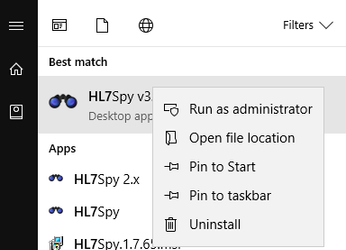
- Launch HL7Spy as an Administrator by right-clicking on the HL7Spy icon and selecting "Run as Administrator". This requires that you are a local machine Administrator. If you are in a locked down environment, you will need to have someone with Administrative access to perform this operation for you.
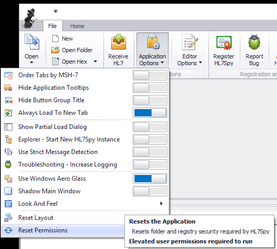
- Within the HL7Spy application select the option: "Reset Permissions" under the "File/Application Options" menu.
, multiple selections available,